Veeam just showed me a demo where you can ask your backup infrastructure a question in plain English and get an HTML report, a ServiceNow ticket, and a PowerPoint deck back. Just type "what happened last night" and it tells you. Who's already thinking about using this for getting insights into the data you protect? This guy
I can't remember who said it, but someone said "Companies are going to be judged on their APIs, not their software pretty soon." The whole time I was listening to their segment, that was all that I was thinking back to. That, and that they are going to get judged, in the right ways.
I thought that what Veeam was working on was genuinely cool. Then I immediately thought about what happens when someone types "how do I save money on storage" and the AI decides to change your RPO from 24 hours to 7 days.
I asked, and got a very telling answer back from the Veeam folks.
This was a Tech Field Day Extra session at RSAC 2026. Veeam brought three presenters across four segments: Rick Vanover on the big picture, Michael Cade and Emilee Tellez on the technical deep dives. The session ran about two hours and covered a lot of ground, but the piece that stuck with me was the last 20 minutes.
The Four Pillars (The TL;DR)
Veeam is restructuring their story around four pillars: Understand, Secure, Resilient, Unleash. If you've been following the data protection space at all this week, the first three will sound familiar. Every vendor at RSAC is talking about knowing your data, securing it, and recovering from incidents.
The Understand pillar is where their recent acquisition lands. They picked up a DSPM company and integrated it as the "Data Command Center," which builds what Michael kept calling "the social network of data." (love that analogy.) It's a graph database with 350+ connectors that maps your data systems, who has access to what, where sensitive data lives, and how it moves. Think of it as a map of your entire data estate, structured and unstructured, with lineage tracking.
The part that resonated with me was the ROT analysis: redundant, obsolete, and trivial data. Every organization has a garage bin full of old data they've been dragging from storage tier to storage tier for years. Some of it is sensitive. Most of it is just taking up expensive space and expanding the attack surface for no reason. Being able to identify that, tier it off to cheaper storage or just get rid of it, is one of those things that sounds boring but saves money and reduces risk.
Three Generations of Disaster
Emilee & Rick walked through a framework that I think is worth calling out because it makes difficult things to think about and predict from the future easy. She broke resilience into three generations (bucket?):
Generation 1 is operational resilience. This is your Bread & Butter Backup & Recovery life. Everyone knows this, and has lived this. Your Fire, flood, hardware failure. You recover to the latest restore point, it's fast, preparation takes days or weeks, and the probability of it happening is low. This is the world backup was built for.
Generation 2 is cyber resilience. Ransomware, targeted attacks, exfiltration. Your recovery point becomes unknown because you don't know when the attacker got in. Recovery time gets longer because you have to verify clean data before restoring. Preparation is inconsistent across organizations, and the probability is medium to high. We've known about this for a while.
Generation 3 is AI resilience. Over-privileged agents, non-human identities, automated workflows that can delete or corrupt data at wire speed. Recovery needs to be specific and fast. Preparation time is random because most organizations haven't even started thinking about it. And the probability is high and climbing. Like, it's REALLY high.
That third column is where things get interesting.
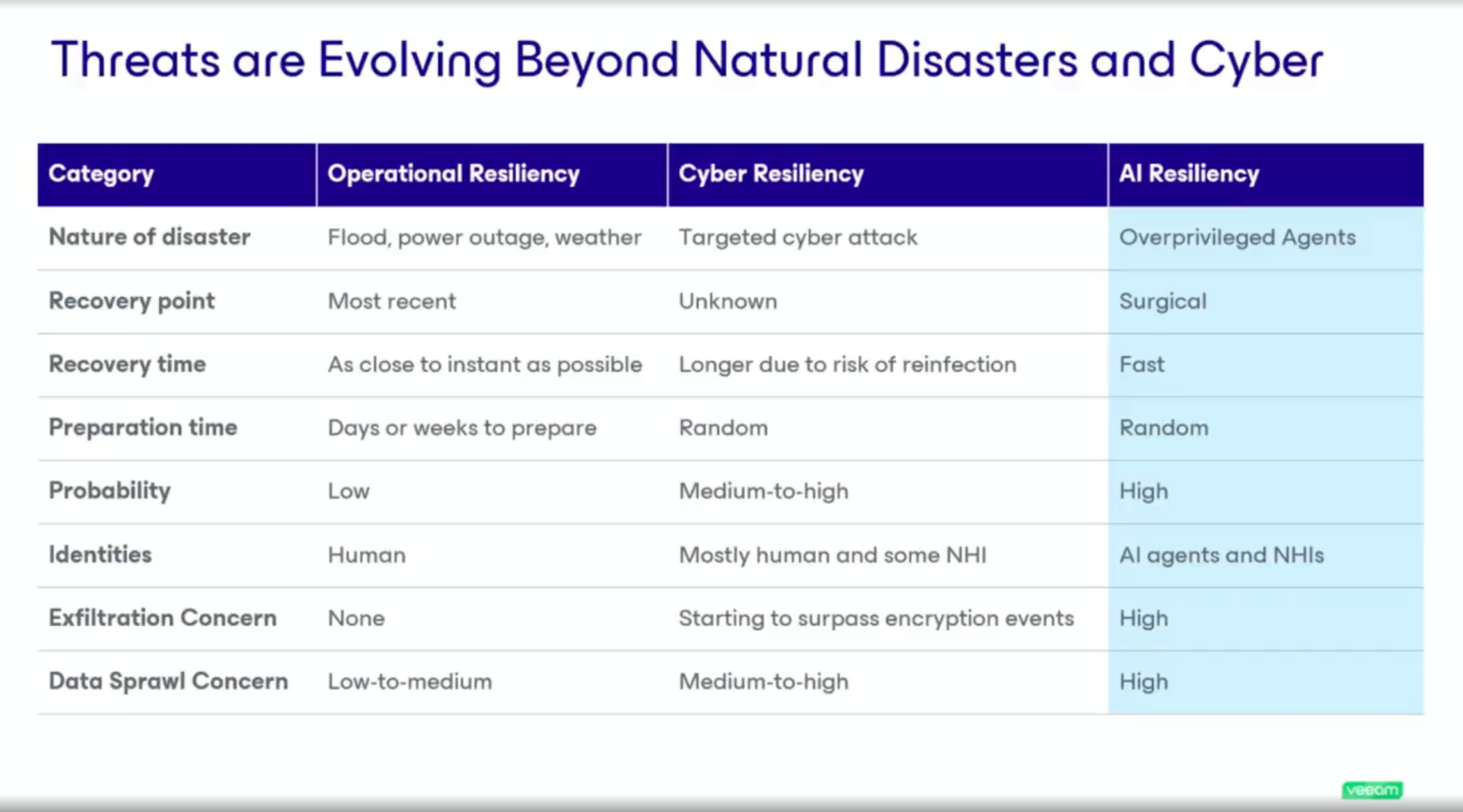
Three generations of disaster. The third column is the one nobody's ready for.
Tom Hollingsworth had a great line during the discussion: "You're giving toddlers dynamite and hoping they figure it out." Veeam's response? That organizations need tools as fast as the problem. Both are right.
The MCP Demo
OK -- This is the part that got me. I am REALLY excited here.
Michael Cade demoed Veeam Intelligence, their natural language interface for managing backup environments. It started as a documentation chatbot (every vendor has one of those) but has evolved into something that can actually query your specific Veeam environment. Ask it what backup jobs failed last night, whether there's malicious activity in your backups, what your current risk posture looks like. It pulls real data and gives you real answers. The coolest part!? Bring your own model!!! That means that this is going to actually be able to integrate into all of your other workflows and MCPs, tools, etc. to know everything!
Example workflow, you pop into a Claude window and ask it to dig into the latest SOC alerts. It goes and talks to your SOC via MCP, gets the latest alerts. Then step 2, then 3, then 4, then it asks Veeam what it thinks. Then it asks Veeam when the last backup was. By the time you're back from getting freshly brewed starbucks, you've got an action report on your desk, waiting for you.
That's the interesting part! The MCP integration. MCP, AKA Model Context Protocol, is a standard for connecting AI interfaces to different backend tools (USB Cable.) Veeam built MCP servers for their platform, and in the demo they connected Veeam Intelligence and ServiceNow into a single Claude Desktop session.
The workflow went like this: ask about your backup environment, get an HTML executive report with color-coded status and recommendations, then take the issues it found and automatically create incident tickets in ServiceNow.
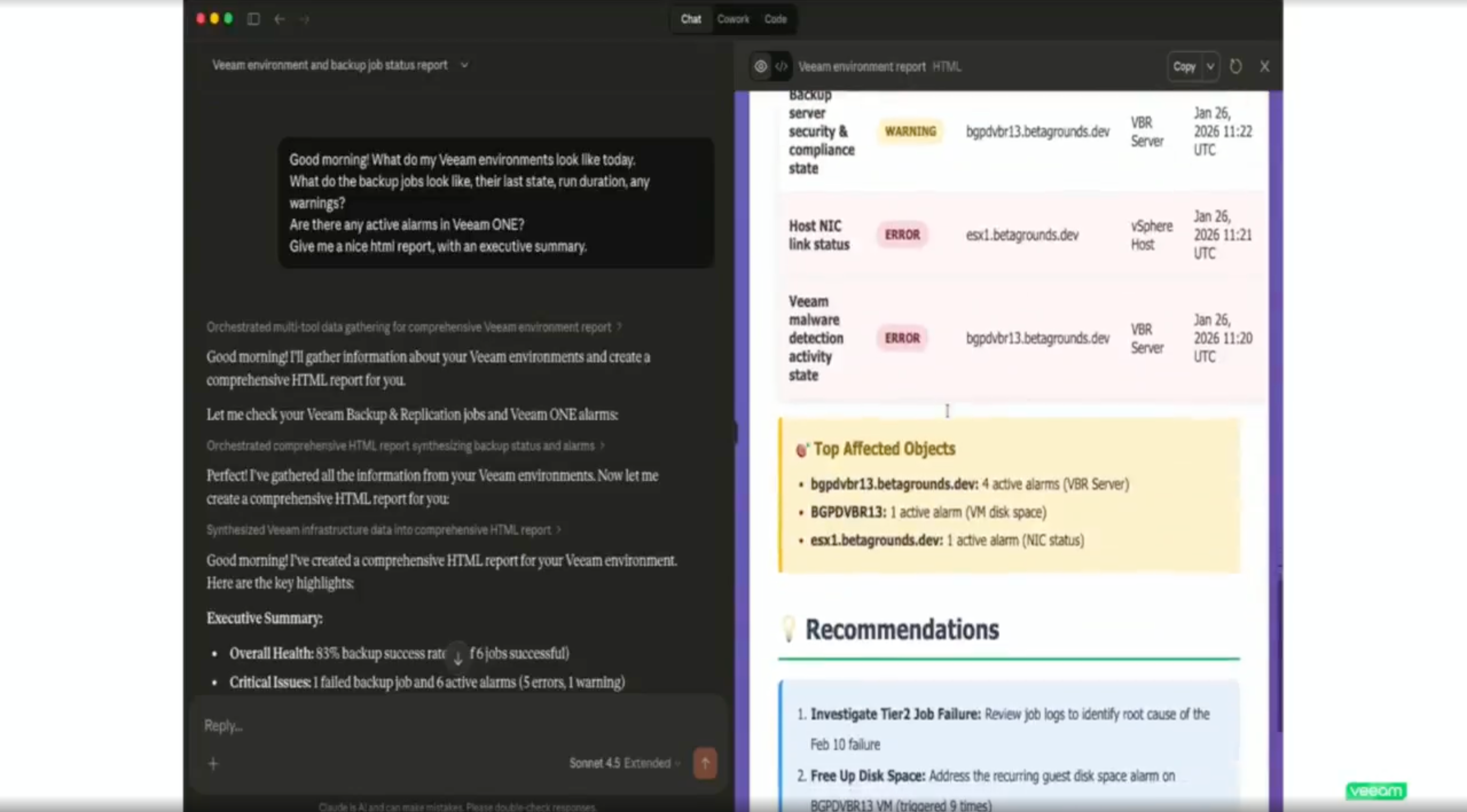
The MCP demo in Claude Desktop. Natural language query, real Veeam environment data, HTML report generated on the spot.
Then it generated a PowerPoint summary for the morning board meeting. All from natural language prompts in one interface.
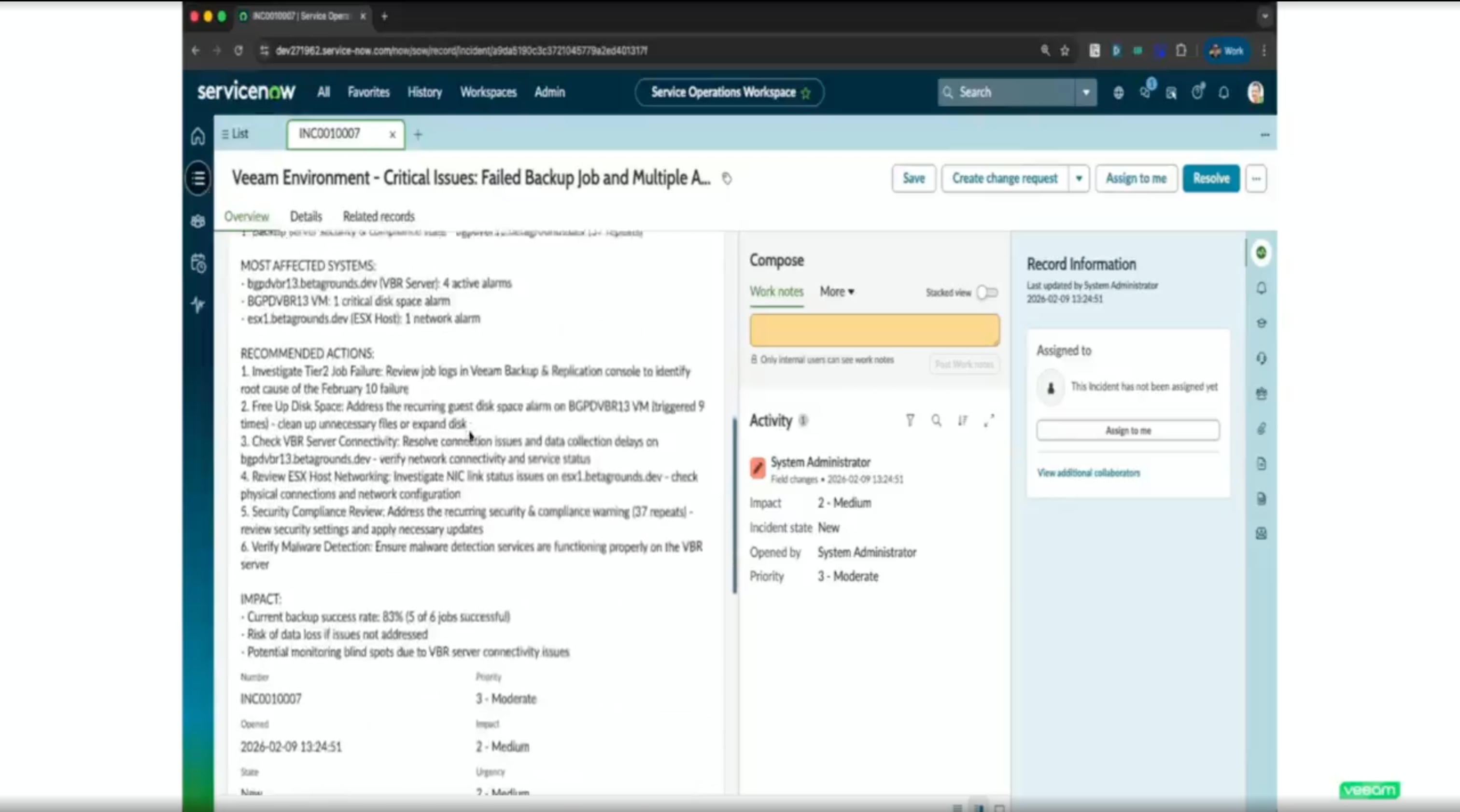
The payoff: a ServiceNow incident ticket created automatically from the same conversation. No copy-paste, no tab switching.
The implication is that MCP becomes the UI layer for infrastructure management. Instead of clicking through dashboards across five different tools, you talk to one interface that has connectors to all of them. Backup status, ticketing, security signals, all in one conversation.
For backup admins who spend their mornings clicking through job statuses and manually creating tickets for failures, this is a real time saver. And it's not hypothetical. The demo was live.
My Three Questions
This is where I got skeptical. Not about the technology, but about the guardrails.
Question 1: What stops an AI agent from making a bad decision about your RPO?
If I can ask the MCP interface to manage my backup environment, and some analyst asks it how to save money, what's to stop it from deciding to change the RPO from 24 hours to 7 days? It doesn't understand your SLA. It doesn't know that the compliance team will lose their minds. It just sees a number it can optimize.
Emilee's answer: they're building specialized internal agents (a backup admin agent, a security agent) that provide contextual guardrails. Before an action is taken, the system would flag that you have an SLA set for 24 hours and surface that conflict. On top of that, they're looking at implementing secondary approval rules. An agent can't unilaterally change a policy. A second admin has to approve it.
I'm not sure if that's the right answer yet, since this is the first AI driven spot that I am truly terrified to be giving write access. I'm thinking maybe something more like two humans have to give the approval, plus the AI that originated the ask. Idk, we'll see where they go with it since this is still EA. Speaking off...
Question 2: Is the MCP integration GA?
No. It's in technical preview. So everything I saw in the demo is real and functional, but it's not something you can deploy in production today. Worth knowing before you get too excited.
Question 3: Can I bring my own AI model, or am I locked into Veeam's?
Out of the box, Veeam Intelligence uses Microsoft OpenAI. But you can bring your own model. If you're running Ollama or another local LLM, it's a configuration change to point it there. That matters for organizations that have data sovereignty requirements or just don't want their backup metadata going through a third-party model.
They also made it clear that only metadata leaves the customer site. No backup data, no sensitive content.
What I'm Watching
The MCP integration is the thing I'll be tracking. It's the most forward-looking piece of what Veeam showed, and it's the one with the most unanswered questions.
- The guardrails for AI-driven actions on backup infrastructure are being built but aren't complete. Secondary approval workflows exist, but the contextual agents that would prevent bad decisions are still in development. This needs to be airtight before it goes GA.
- MCP security in general is an open question across the industry, not just for Veeam. Jack Poller asked about what knowledge an AI agent can extract from your backup environment once you expose it via MCP. The answer (only metadata, RBAC enforced, no ability to delete immutable backups) is reasonable, but MCP security is going to be its own conversation at every conference for the next two years.
- The DSPM acquisition is only about 100 days old. The data command graph and ROT analysis are compelling, but I want to see how tightly they integrate with backup policy decisions over time. Michael hinted that the graph data will eventually inform automated backup policies. That's where it gets powerful and where the guardrails question comes back around.
Veeam is making a bet that natural language is the future interface for infrastructure management. I think they're right. But the distance between "ask your backup system a question" and "let your backup system take action on the answer" is where all the risk lives. They know that. The fact that they said "we're still building the guardrails" instead of "it's all figured out" is why I'm paying attention.
The full Tech Field Day Extra session is available on YouTube. Five segments covering the full Veeam 2026 story, from DSPM to MCP.